Why Your Gear Matters (Even with AI Tools)
AI video tools like HeyGen, Synthesia, and Pictory have made it possible to create professional videos without a film crew. But here is what most guides overlook: the quality of your input directly determines the quality of your output.
Feed a muddy microphone recording into Descript and you will spend twice as long cleaning it up. Record a webcam video with poor lighting and even the best AI background removal will struggle with noisy edges. Use cheap headphones to review your AI-generated voiceover and you will miss audio artifacts your audience will not.
The good news is that you do not need to spend thousands. A focused investment in the right gear — a solid microphone, proper lighting, and a reliable webcam — will make every AI tool in your stack perform better. This guide covers the 13 pieces of gear that deliver the biggest quality improvement for AI video creators in 2026, with options for every budget.
Quick Picks — Top 3 Essentials for AI Video Creators

Quick Picks: Our Top Recommendations
| Category | Our Pick | Price (AUD) |
|---|---|---|
| Best Ring Light | Neewer 18" Ring Light | ~$65 |
| Best Starter Mic | Blue Yeti USB | ~$150 |
| Best Podcast Mic | Rode PodMic USB | ~$160 |
| Best Webcam | Logitech C922 Pro | ~$115 |
| Best Productivity Tool | Elgato Stream Deck MK.2 | ~$189 |
| Best Studio Headphones | Audio-Technica ATH-M50x | ~$260 |
| Best NC Headphones | Sony WH-1000XM5 | ~$380 |
| Best SD Card | SanDisk 256GB Extreme Pro | ~$65 |
| Best Drawing Tablet | Wacom Intuos Small | ~$115 |
Best Lighting: Neewer 18" Ring Light

Neewer 18-inch Ring Light with Tripod Stand
Lighting is the single most cost-effective upgrade you can make. The Neewer 18-inch ring light provides soft, even illumination that eliminates harsh shadows and makes AI background removal tools work dramatically better. At around $65, it is the highest-impact, lowest-cost item on this list.
- Adjustable colour temperature (3200K-5600K) for warm or cool tones
- Dimmable brightness for different recording environments
- Includes phone holder and tripod stand
- Creates the signature "ring catch light" in your eyes for a professional look
- Powers via USB — works with power banks for portable setups
Why it matters for AI video: Tools like HeyGen and D-ID use your webcam footage as input for AI avatars. Even lighting means cleaner face detection, better lip-syncing accuracy, and fewer artifacts in the final output. If your lighting is uneven, the AI has to work harder and the results show it.
Check Price on Amazon →Best Microphones for AI Video Creators
Audio quality makes or breaks a video. Research consistently shows that viewers will tolerate average visuals but abandon videos with poor audio within seconds. For AI video creators, clean audio input also means better results from tools like Descript (AI-powered editing), Murf AI (voice cloning), and Opus Clip (repurposing).
Blue Yeti USB Microphone
The Blue Yeti remains the most popular USB microphone for content creators for good reason. It delivers studio-quality audio out of the box with zero configuration. Plug it in via USB and you are recording in seconds — no audio interface, no drivers, no fuss.
- Four pickup patterns: cardioid, bidirectional, omnidirectional, stereo
- Built-in gain control and headphone monitoring
- Plug-and-play USB — works on Mac, Windows, and Linux
- Solid metal construction with adjustable desk stand
- Multiple colour options including Blackout, Silver, and Midnight Blue
Why it matters for AI video: If you are using Descript for text-based editing, clean audio means more accurate transcription and fewer manual corrections. If you are creating voice clones with ElevenLabs or Murf AI, the Blue Yeti captures the tonal detail these tools need to produce a natural-sounding clone.
Check Price on Amazon →
Rode PodMic USB
The Rode PodMic USB is an Australian-made dynamic microphone that excels at rejecting background noise. Unlike the Blue Yeti (a condenser), the PodMic's dynamic capsule naturally filters out keyboard clicks, air conditioning, and room echo — making it the better choice if you record in an untreated room.
- Dynamic capsule rejects background noise naturally
- Built-in USB-C interface — no audio interface needed
- Internal pop filter reduces plosives
- Broadcast-quality sound used by professional podcasters
- All-metal construction with integrated swing mount
Why it matters for AI video: If you are recording in a home office with ambient noise, the PodMic will give you cleaner source audio than a condenser mic. Cleaner audio means AI transcription tools (Descript, Whisper) produce more accurate results with fewer corrections needed.
Check Price on Amazon →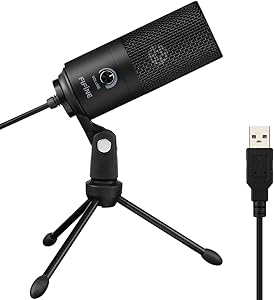
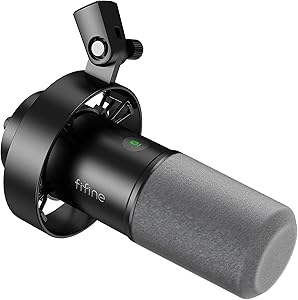
HyperX QuadCast S USB Microphone
The HyperX QuadCast S combines excellent audio quality with customisable RGB lighting that looks great on camera. It is the go-to choice for creators who do both streaming and video production. The built-in anti-vibration shock mount and tap-to-mute sensor add practical touches that streamers will appreciate.
- Dynamic RGB lighting with HyperX NGENUITY software control
- Four polar patterns (stereo, omnidirectional, cardioid, bidirectional)
- Tap-to-mute with LED indicator
- Built-in anti-vibration shock mount
- USB-C connectivity
Elgato Wave:3 USB Condenser Microphone
The Elgato Wave:3 stands out with its Clipguard technology that prevents audio peaking, and the Wave Link digital mixing software that lets you control multiple audio sources without a physical mixer. If you are already in the Elgato ecosystem (Stream Deck, Facecam, Green Screen), the Wave:3 integrates seamlessly.
- Clipguard technology prevents audio distortion at the source
- Wave Link software for digital audio mixing (up to 8 channels)
- 24-bit/96kHz audio resolution
- Capacitive mute button
- Stream Deck integration for one-button audio control
Best Webcam: Logitech C922 Pro Stream
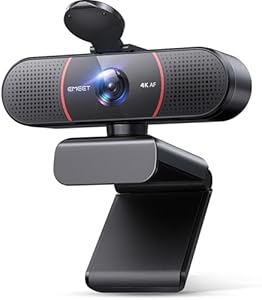
Logitech C922 Pro Stream Webcam
The Logitech C922 remains the most reliable webcam for video creators on a budget. It delivers sharp 1080p at 30fps (or 720p at 60fps for smoother streaming), with excellent autofocus and automatic light correction that adapts to different environments. For AI video creators, it provides the consistent, high-quality webcam footage that tools like HeyGen need for natural-looking avatars.
- Full HD 1080p at 30fps / 720p at 60fps
- Automatic light correction for variable environments
- Dual microphones (decent backup, but use a dedicated mic for production)
- Tripod-compatible mount + monitor clip
- Background removal compatible (works with XSplit, OBS)
Why it matters for AI video: When recording yourself for HeyGen avatar creation or Synthesia custom avatars, consistent video quality is critical. The C922 provides reliable colour reproduction and face tracking that AI tools depend on for accurate avatar generation.
Check Price on Amazon →Best Streaming & Production Gear: Elgato Ecosystem

Elgato Stream Deck MK.2 (15 Keys)
The Stream Deck is not just for streamers. For AI video creators, it becomes a physical control centre for your entire production workflow. Assign buttons to launch Descript, switch scenes in OBS, trigger AI generation in your browser, or control audio mixing — all without touching the keyboard.
- 15 customisable LCD keys with drag-and-drop configuration
- Multi-action support: one button triggers a sequence of actions
- Integrations with OBS, Descript, Zoom, Spotify, and 200+ plugins
- Folder system for organising profiles by project or workflow
- Detachable USB-C cable with adjustable stand
AI workflow example: Set up a "Record" button that mutes notifications, launches Descript recording, starts your ring light, and opens your script — all in one press. Set up a "Publish" button that exports from Descript, uploads to YouTube, and queues an Opus Clip repurposing job.
Check Price on Amazon →
Elgato Green Screen (Collapsible)
While AI-powered background removal has improved dramatically, a physical green screen still delivers the cleanest results — especially for live streaming where real-time processing needs every advantage. The Elgato collapsible design pops up in seconds and retracts into a compact aluminium case when not in use.
- Pneumatic pop-up design — sets up in 3 seconds
- Wrinkle-resistant chroma-key green fabric
- Retracts into compact floor case (no wall mounting needed)
- 148 x 180 cm coverage — wide enough for standing presentations
- Works with OBS, Zoom, Teams, and all major streaming software

Elgato HD60 X Capture Card
The HD60 X captures 4K30 passthrough and 1080p60 HDR10 recording via USB 3.0. For AI video creators, it is useful for capturing footage from external cameras, game consoles, or secondary computers — feeding high-quality source material into your AI editing pipeline.
- 4K30 HDR10 passthrough / 1080p60 HDR10 capture
- USB 3.0 — no PCIe slot required
- VRR (Variable Refresh Rate) support
- Zero-lag passthrough for gaming while recording
- Works with OBS, Streamlabs, Descript, and all major editors
Best Headphones for Video Editing

Audio-Technica ATH-M50x Studio Monitor Headphones
The ATH-M50x is the industry standard for studio monitoring and there is a reason you see them in every professional studio. The flat frequency response means you hear your audio exactly as it is — no artificial bass boost or treble enhancement. This is critical when reviewing AI-generated voiceovers from tools like Murf AI or ElevenLabs, where subtle artifacts can slip past consumer headphones.
- 45mm large-aperture drivers with flat frequency response
- Circumaural (over-ear) design for isolation and comfort
- Three detachable cables included (straight, coiled, short)
- 90-degree swivelling earcups for single-ear monitoring
- Foldable design for portability

Sony WH-1000XM5 Wireless Noise-Cancelling Headphones
If you edit in a busy home office, co-working space, or café, the Sony XM5 is the best noise-cancelling headphone available. The ANC eliminates distractions so you can focus on your edit, and the 30-hour battery means multi-day use between charges. Not as flat as the ATH-M50x for critical mixing, but exceptional for general editing and AI voiceover review.
- Industry-leading adaptive noise cancellation
- 30-hour battery life (3-minute quick charge = 3 hours playback)
- Speak-to-Chat pauses audio when you talk
- Multipoint connection (two devices simultaneously)
- Ultra-lightweight at 250g for all-day comfort
Best Storage: SanDisk 256GB Extreme Pro SDXC

SanDisk 256GB Extreme Pro SDXC Card
Video files are large. A single hour of 4K footage can consume 40-100GB. The SanDisk Extreme Pro delivers read speeds up to 200MB/s, which means faster file transfers to your editing machine and less time waiting before you can start your AI-powered editing workflow.
- 200MB/s read / 140MB/s write speeds
- UHS Speed Class 3 (U3) and Video Speed Class 30 (V30)
- Built for 4K UHD video recording
- Temperature-proof, waterproof, shock-proof, X-ray proof
- Includes RescuePRO Deluxe data recovery software
Best Drawing Tablet: Wacom Intuos Small

Wacom Intuos Small (Bluetooth)
A drawing tablet changes how you interact with creative tools. For AI video creators, it is invaluable for creating custom thumbnails with Midjourney + Photoshop, making precise edits in video timelines, and creating annotations or illustrations for educational content. The Wacom Intuos is the entry-level standard with Bluetooth connectivity for a clean desk setup.
- 4,096 levels of pressure sensitivity
- Bluetooth connectivity (wireless) + USB option
- Battery-free pen with two customisable buttons
- Includes free creative software (Clip Studio Paint, Corel Painter)
- Compact size perfect for desk setups
Get the essentials that make the biggest impact on video quality:
- Neewer Ring Light (~$65) — Professional lighting
- Logitech C922 Webcam (~$115) — Sharp 1080p video
- SanDisk 256GB SD Card (~$65) — Fast, reliable storage
Creator Kit (~$500 AUD)
Everything in the Budget Kit plus professional audio:
- Budget Kit items (~$280)
- Blue Yeti USB Microphone (~$150) — Studio-quality voice
- SanDisk 256GB SD Card (~$65) — Second card for backup
Pro Kit (~$1,000 AUD)
The complete AI video creator setup:
- Neewer Ring Light (~$65)
- Logitech C922 Webcam (~$115)
- Rode PodMic USB (~$160)
- Elgato Stream Deck MK.2 (~$189)
- Audio-Technica ATH-M50x (~$260)
- Wacom Intuos Small (~$115)
- SanDisk 256GB SD Card (~$65)
Ready to Level Up Your AI Video Setup?
Pair any of this gear with the right AI tools and you will produce professional videos in half the time. Check out our Best AI Video Tools for 2026 guide for the complete software stack.
Complete Creator Kit — All 3 Essentials
Ring Light + Blue Yeti + Webcam = Under $220 total
 Neewer Ring Light →
 Blue Yeti Mic →
 Logitech C922 →